Gemini Omni 1.2 Flash: Create 15-Second AI Videos

Gemini Omni 1.2 Flash is Google's video model for clips up to 15 seconds long with native audio. You can start from a text prompt, a still image, or reference images and clips. Gemini Omni 1.2 Flash keeps faces, outfits, products, and on-screen text consistent across the whole clip.

What Can Gemini Omni 1.2 Flash Do?

Gemini Omni 1.2 Flash generates videos of 4 to 15 seconds with sound. Google released Gemini Omni 1.2 Flash as a generally available model in November 2026. All six capabilities below are available in the Gemini Omni generator today.

Videos Up to 15 Seconds

Gemini Omni 1.2 Flash generates one clip of up to 15 seconds. You can choose 4, 6, 8, 10, 12, or 15 seconds. A 15-second clip fits a full product reveal, a short dialogue scene, or a story with several shots. First-and-last-frame clips are limited to 10 seconds.

Closer Match to Your References

Gemini Omni 1.2 Flash accepts up to 10 reference images and up to 3 reference video clips. Each reference clip can be up to 15 seconds long. Faces, clothing, logos, brand colors, and lettering stay closer to the references across camera angles than in Gemini Omni 1.1 Flash.

Dialogue with Lip-Sync

Gemini Omni 1.2 Flash generates speech, ambient sound, and sound effects together with the video. You write the dialogue in the prompt. Lip movement follows the speech, and each speaking character gets a distinct voice. Uploading your own audio as a reference is not supported.

Continuous Camera Moves

Gemini Omni 1.2 Flash follows camera directions written in plain language. Supported moves include FPV flythroughs, orbits, push-ins, and zoom-outs. Continuous shots have fewer unwanted jump cuts than in Gemini Omni 1.1 Flash.

First and Last Frame Control

Gemini Omni 1.2 Flash can animate between two images you upload. The first image becomes the opening frame. The second image becomes the closing frame. You describe the motion in between. First-and-last-frame clips run 4 to 10 seconds.

360p Drafts to 4K Output

Gemini Omni 1.2 Flash outputs 360p, 720p, 1080p, or 4K video. A 360p clip costs the fewest credits, so 360p suits testing a prompt. Generating again at a higher resolution creates a new take, not an upscale of the draft. 4K output requires a paid plan. Every resolution supports 16:9 and 9:16.

What's New in Gemini Omni 1.2 Flash Compared With 1.1 Flash?

Gemini Omni 1.2 Flash makes clips up to 15 seconds long, while Gemini Omni 1.1 Flash stops at 10 seconds. Gemini Omni 1.2 Flash also matches references more closely, handles dialogue better, and produces fewer jump cuts. Gemini Omni 1.2 Flash keeps the multimodal input and first-and-last-frame control of Gemini Omni 1.1 Flash.

CapabilityGemini Omni 1.1 FlashGemini Omni 1.2 Flash
Clip lengthUp to 10 seconds per generationUp to 15 seconds per generation
Reference consistencyImage and video references guide the resultCloser matching of faces, outfits, products, logos, and text across shots
Dialogue and audioNative audio that follows the promptMore natural dialogue, clearer lip-sync, and distinct voices for multiple speakers
Camera movementPrompt-directed camera movesComplex orbits and flythroughs with fewer unwanted jump cuts
Release statusPreviewGenerally available

Gemini Omni 1.1 Flash is still available in the generator. Choose Gemini Omni 1.1 Flash to keep a consistent look in a project you started with 1.1.

What Can You Create with Gemini Omni 1.2 Flash?

Gemini Omni 1.2 Flash works best for multi-shot explainers, continuous camera moves through real places, on-model product videos, and vertical motion graphics. Each example below shows the prompt from Google's Gemini Omni 1.2 Flash demo. You can copy each prompt and replace the reference images with your own.

01

Turn One Photo into a 15-Second Explainer

Gemini Omni 1.2 Flash can turn one photo into a 15-second explainer with several shots. Use reference mode and add the photo as a reference image. In the prompt, state the length, the number of shots, and how the shots connect. Keep the action in each shot simple, because fast, complex motion fails most often.

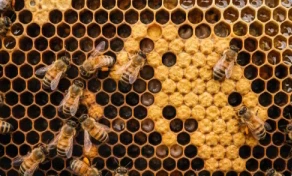
Close-up reference photo of honeybees on a honeycombReference image

Prompt

A 15-second science explainer inside the living hive from Image 1, in four shots joined by hard cuts.

Gemini Omni 1.2 result
02

Fly One Continuous Drone Shot Through a Real Place

Gemini Omni 1.2 Flash can fly one continuous camera move between two views of a real place. Use reference mode and add an exterior photo and an interior photo. In the prompt, write "the first image" and "the second image" so the camera knows where to start and where to end. This setup suits travel, venue, and real-estate videos.

Reference photo of the Pantheon portico in RomeReference 1
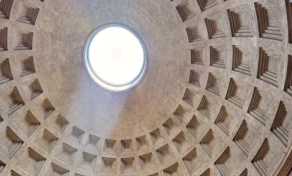
Reference photo of the Pantheon dome and oculus from insideReference 2

Prompt

A cinematic drone shot of the Pantheon in Rome that moves from the first image to the second image.

Gemini Omni 1.2 result
03

Try Several Outfits on One Model

Gemini Omni 1.2 Flash can dress one model in several outfits in a single clip. Use reference mode and add one photo of the model plus a front photo and a back photo of each garment. The back photos keep garment details accurate when the model turns. Every photo counts toward the limit of 10 reference images.

Prompt

The woman from Image 1 models three outfits, one after another. Each change is a hard match cut.

Gemini Omni 1.2 result
04

Animate a Poster for Vertical Feeds

Gemini Omni 1.2 Flash can animate a finished poster into a 9:16 clip for Reels, Shorts, or TikTok. Use reference mode, add the poster, and set the aspect ratio to 9:16. In the prompt, list the order in which each element appears. Name exact colors, materials, and lighting, such as a hex code or a color temperature, to keep the original look.

Prompt

Create a 9:16 vertical motion graphic poster animation from this reference image, building sequentially layer-by-layer from an empty pastel dusty-mauve studio cyclorama (#E5CEDC) to the 2700K dimmer plinth, backlit alabaster HALO letters, Murano glass GLOW letters, and functional LUMEN lamp.

Reference, 1.1 and 1.2

How Do You Make a Video with Gemini Omni 1.2 Flash?

You make a Gemini Omni 1.2 Flash video in three steps: write the prompt, choose the settings, and generate.

01

Write the Prompt and Add References

Describe what happens, who speaks, and how the camera moves. A text prompt alone works. Add a first frame, a first and last frame, or reference images and clips to control a character, product, or style.

02

Choose Length, Resolution, and Aspect Ratio

Choose a length from 4 to 15 seconds, a resolution from 360p to 4K, and 16:9 or 9:16. The generator shows the credit cost before you generate.

03

Generate, Review, and Finalize

Review the result and adjust the prompt or references if needed. To save credits, settle the prompt at 360p first. Then generate the final version at 720p, 1080p, or 4K with the same prompt and references.

Gemini Omni Pricing

Choose monthly, annual, or one-time credits for Gemini Omni AI video generation, product videos, ad creatives, social media clips, and image-to-video workflows.

Basic

Save 30%
$20.99/month$29.9 /month

$251.88 / year

Save $106.92 per year

Great for getting started and everyday creative work.

800 AI credits per month
Light creation and everyday exploration
Multiple creation models
Standard generation speed
Watermark-free exports
Private creation workspace
Commercial use rights
Basic customer support

Pro

Save 30%Popular
$34.99/month$49.9 /month

$419.88 / year

Save $178.92 per year

For steady creation, content publishing, and commercial use.

2,000 AI credits per month
For ongoing creation and content publishing
More creation models
Priority generation queue
HD exports
Watermark-free exports
Private creation workspace
Commercial use rights
Priority customer support

Premium

Save 30%
$69.99/month$99.9 /month

$839.88 / year

Save $358.92 per year

For teams, businesses, and high-frequency creative production.

5,000 AI credits per month
Built for high-frequency creation and team collaboration
Full creative toolset
Fastest generation speed
High-spec exports
Watermark-free exports
Private creation workspace
Commercial use rights
Dedicated customer support

All prices are in USD. Annual plans are billed annually and credits are granted monthly. Actual credit usage varies by model, resolution, duration, and audio settings.

Gemini Omni 1.2 Flash FAQ

Direct answers about what Gemini Omni 1.2 Flash does, what it costs, and where it falls short.

Gemini Omni 1.2 Flash is Google's AI video generation model. Google released Gemini Omni 1.2 Flash as a generally available model in November 2026. Gemini Omni 1.2 Flash turns text, images, and video references into clips of up to 15 seconds with synchronized audio.

Start Creating with Gemini Omni 1.2 Flash